Exploring Angular Unit Testing with Jasmine and Karma: A Comprehensive Test Case Analysis
2023-05-19
This is a continuation post of Angular Adventures: Creating a Tic Tac Toe Game and Sharing My Journey read it here. For this part 2 of Angular Adventures, I will be sharing my learnings on unit testings. I decided to write some test and here's my learnings.
In the world of Angular development, unit testing plays a vital role in ensuring the stability and reliability of software applications. In this blog post, we will delve into a specific test case that showcases the power of Jasmine and Karma as testing frameworks for Angular projects. By examining a test case for the 'SquareComponent,' we will gain insights into the practical application of these tools and their significance in the testing ecosystem.
What is Jasmine?
Jasmine is a popular behavior-driven development (BDD) framework for testing JavaScript code, including Angular applications. It provides a clean and expressive syntax that aids in writing comprehensive test cases. With Jasmine, developers can define test suites, describe individual test scenarios, and make assertions to validate expected behaviors.
What is Karma?
Karma serves as a test runner for JavaScript applications, particularly suited for Angular projects. It enables seamless integration with various testing frameworks, including Jasmine, and facilitates the execution of test cases across multiple browsers and platforms. Karma's real-time feedback loop empowers developers to rapidly identify and rectify issues, enhancing the overall quality of the application.
Test Overview:
The test case under examination focuses on the 'SquareComponent.' This component is responsible for rendering a square button on the user interface, representing either an 'X' or an 'O' based on the input value provided. The primary objective of this test suite is to ensure that the component behaves correctly under different input scenarios.
Test Scenarios:
- 'should create': This test verifies that the 'SquareComponent' is created successfully, ensuring its existence and proper initialization.
import { ComponentFixture, TestBed } from '@angular/core/testing';
import { SquareComponent } from './square.component';

describe('SquareComponent', () => {
  let component: SquareComponent;
  let fixture: ComponentFixture<SquareComponent>;

  beforeEach(async () => {
    await TestBed.configureTestingModule({
      declarations: [ SquareComponent ]
    })
    .compileComponents();

    fixture = TestBed.createComponent(SquareComponent);
    component = fixture.componentInstance;
    fixture.detectChanges();
  });

  it('should create', () => {
    expect(component).toBeTruthy();
  });
- 'should render value as X when input value is X': Here, the test case assigns the value 'X' to the component and checks whether the rendered button reflects this value correctly.
it('should render value as X when input value is X', () => {
    component.value = 'X';
    fixture.detectChanges();
    const button = fixture.nativeElement.querySelector('button.x');
    expect(button).toBeTruthy();
    expect(button.textContent.trim()).toEqual('X');
  });
- 'should render value as O when input value is O': Similar to the previous scenario, this test assigns the value 'O' and validates the appropriate rendering of the button.
it('should render value as O when input value is O', () => {
    component.value = 'O';
    fixture.detectChanges();
    const button = fixture.nativeElement.querySelector('button.o');
    expect(button).toBeTruthy();
    expect(button.textContent.trim()).toEqual('O');
  });
- 'should not render value when input value is null': This scenario examines the behavior of the component when the input value is null. It ensures that the button remains empty in such cases.
 it('should not render value when input value is null', () => {
    component.value = null;
    fixture.detectChanges();
    const button = fixture.nativeElement.querySelector('button');
    expect(button).toBeTruthy();
    expect(button.textContent.trim()).toEqual('');
  });
- 'should apply the "x" class when input value is "X"': In this test, the presence of the CSS class 'x' is evaluated when the input value is 'X.' This verifies the correct application of styling based on the input.
it('should apply the "x" class when input value is "X"', () => {
    component.value = 'X';
    fixture.detectChanges();
    const button = fixture.nativeElement.querySelector('button.x');
    expect(button).toBeTruthy();
  });
- 'should apply the "o" class when input value is "O"': Similar to the previous scenario, this test ensures the application of the 'o' class when the input value is 'O.'
it('should apply the "o" class when input value is "O"', () => {
    component.value = 'O';
    fixture.detectChanges();
    const button = fixture.nativeElement.querySelector('button.o');
    expect(button).toBeTruthy();
  });
- 'should not apply the "x" or "o" class when input value is null': Lastly, this scenario examines the absence of both the 'x' and 'o' classes when the input value is null, confirming that no unnecessary styling is applied.
it('should not apply the "x" or "o" class when input value is null', () => {
    component.value = null;
    fixture.detectChanges();
    const button = fixture.nativeElement.querySelector('button');
    expect(button.classList.contains('x')).toBeFalse();
    expect(button.classList.contains('o')).toBeFalse();
  });
});
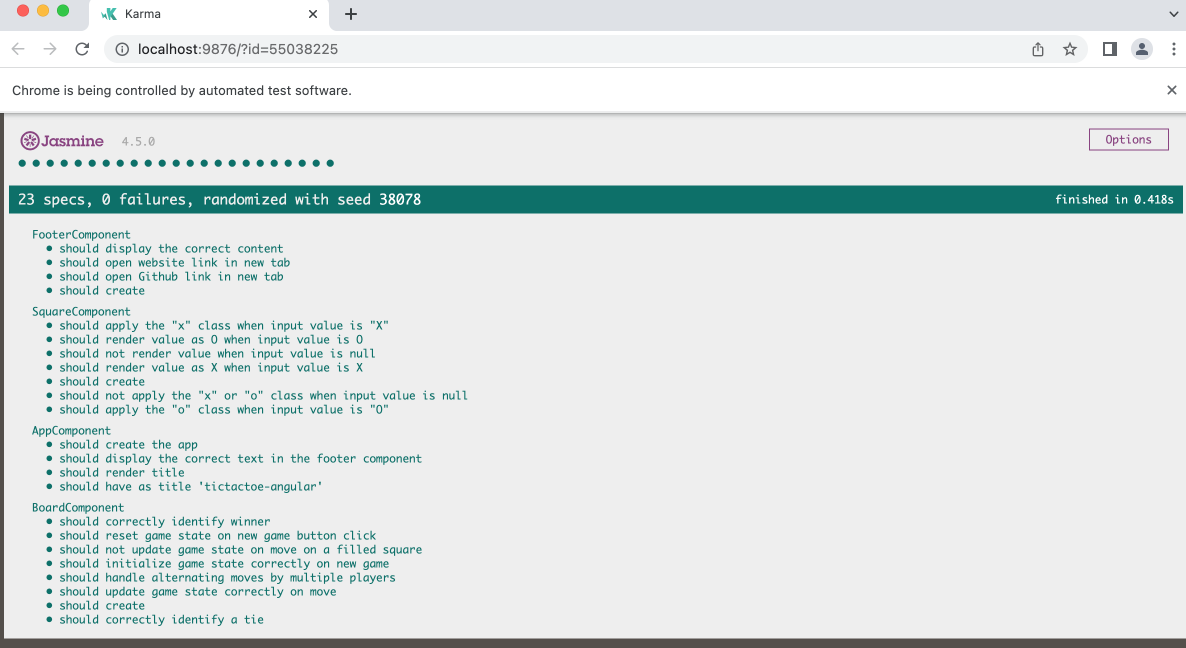
I ran the test above using the test runner, Karma. Here's a screenshot of it:
Conclusion
Unit testing is a crucial aspect of software development, and Angular provides powerful tools like Jasmine and Karma to facilitate this process. In this blog post, we explored a specific test case for the 'SquareComponent' that showcased various testing scenarios. By leveraging Jasmine's expressive syntax and Karma's seamless integration, developers can ensure the correctness and reliability of their Angular applications. Incorporating unit tests early in the development process not only aids in catching bugs and regressions but also promotes code maintainability and scalability.
- Here's my github repo for TicTacToe Angular: click here
- Here's my TicTacToe Angular project that I deployed using Firebase: click here
- Enjoy playing!
Also on codewithkatyrosli.com
JavaScript Classes: Building Reusable Objects with Object-Oriented Programming, 2023-07-23
Today, I'll be sharing about JavaScript classes. JavaScript classes are a fundamental part of modern JavaScript, introduced in ECMAScript 2015 (ES6). They provide a clean and organized way to create reusable objects with shared properties and methods. Classes are a blueprint for creating objects, and they follow object-oriented programming principles, allowing you to model real-world entities easily.